EngageMap.
Enterprise stakeholder platforms are built for large, complex programmes and priced accordingly. EngageMap is a smaller tool, for in-house leads, small teams and independent practitioners. It runs in your browser, so stakeholder records stay on your own device.
Neither edition is available yet. EngageMap and EngageMap Pro are in development, members hear the launch dates first.
Join the waiting list.
Tell us the programme you would use it on and we will let you know when the free edition and EngageMap Pro open. Two minutes, no obligation.
The whole job, in four screens.
The map, the record of who you have spoken to, the things that have slipped, and the documents at the end of it.
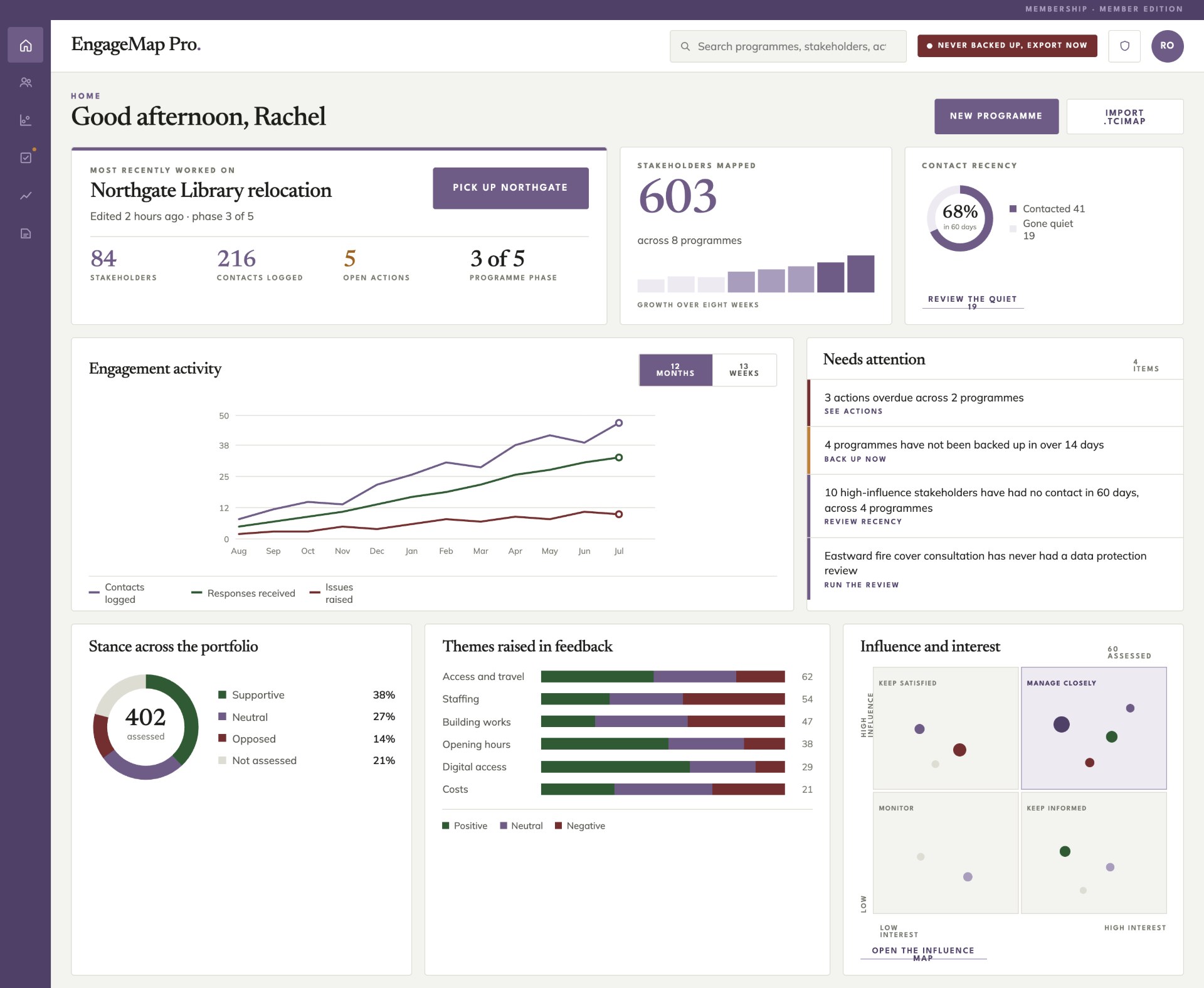
Influence and interest
Map influence and interest
Score each stakeholder and see them land in the quadrant that tells you how to treat them.
Programme record
Record what happens
Contacts, responses, issues and actions, each held against the stakeholder it came from.
Needs attention
See what needs attention
Stance, recurring themes and contact recency, so you notice the people who have gone quiet.
Programmes, backups and exports
Produce the documents
Word and Excel out, plus the map image and a project file you keep yourself.
First, four questions.
If a project is statutory, judicially reviewable, contested or needs a defensible audit trail, EngageMap says so and points you to tCI advice or assurance instead.
Not the right tool for every programme.
If your programme is large, regulated or spread across several teams, an enterprise stakeholder platform will do things EngageMap does not, and it is worth the money. EngageMap is deliberately smaller: one practitioner or a small team, a stakeholder list and the documents that have to come out of it. Start free on the site; the full tool, EngageMap Pro, comes with tCI membership.
How the mapping works.
Influence & interest
Build a shared stakeholder list and place people on the map by dragging, scored and positioned by influence and interest.
A five-point stance
Each stakeholder carries a stance from champion to blocker, their interest, what’s at stake for them, and contact details.
Organisations too
A council or a campaign group is mapped as a stakeholder in its own right, not as a label on a person.
Typed relationships
Record who reports to whom, who’s allied and who’s in conflict, so the map shows the network, not just the names.
Many maps, one list
Hold several maps over the same stakeholder list, map by phase, by workstream or by decision within one programme.
Quadrant guidance
Manage closely, keep satisfied, keep informed or monitor: the map tells you how to treat each group, not just where they sit.
A map is not a plan.
Log engagements, set actions with owners and due dates, and take dated snapshots to see how positions have moved across a programme.
Real files out, generated in the browser.
Engagement plans, stakeholder registers, activity reports and action lists come out as Word documents. The register also exports to Excel and CSV, and the map as an image for decks. Work saves as a project file you can back up, move between devices or send to a colleague, and existing spreadsheets come in through a guided column mapper.
Your data stays yours.
Everything stays in your browser
Records sit in your own browser on the device you work on. Nothing is uploaded or synced, and tCI is neither controller nor processor. Export the project file to keep a backup.
No AI reading your people
No model reads your stakeholder records. You apply the method; the tool does not score people for you.
No claim to certify
EngageMap doesn’t assure or certify your engagement. It carries plain-language data guidance and a controller self-check built in.
What’s included
A single map, free to try.
The gate, the scoring and one map: the whole method.
Planned: everything, with membership.
What EngageMap Pro is being built to do, for your whole practice.